
Construction · Estimating
Construction Take Off
Accurate quantity takeoffs from your drawings
The problem
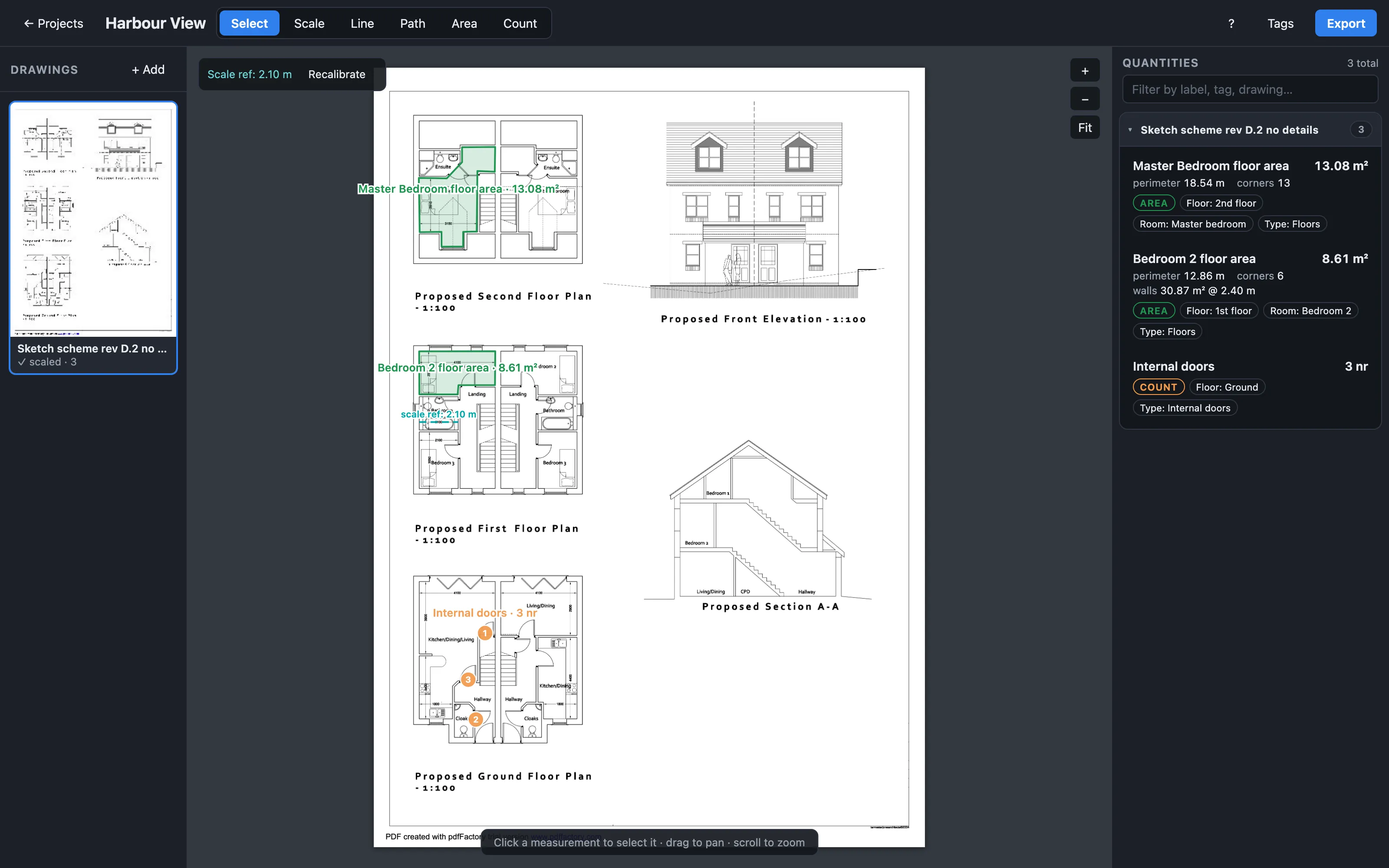
Construction Take Off helps estimators and contractors produce accurate, well-organised quantity takeoffs directly from construction drawings. Upload a full drawing set, calibrate the scale once, measure lengths and areas on screen, tag every measurement with its purpose, and export structured CSV and PDF documents ready for pricing and tendering.
How it works
Real tasks and outcomes — not a generic feature list.
- 1
Upload and calibrate
Import your drawing set as PDF or image files. Set the scale on a known dimension so every measurement is accurate across the full plan.
- 2
Measure and tag
Draw lengths, areas and counts directly on the plan. Tag each measurement with its trade, location or item code so nothing gets lost in the export.
- 3
Review and export
Check your quantities in a structured list, then export clean CSV for your spreadsheet or a formatted PDF for the tender pack.
Key features
Scale calibration
Set scale once per drawing and measure with confidence across the full sheet.
Tagged measurements
Every quantity carries a label, trade and note so exports stay organised.
CSV and PDF export
Output structured data for pricing or polished documents for clients.
Drawing set support
Work across multiple sheets in a single project without losing context.
How your data is saved
Your takeoff work belongs to you. Construction Take Off saves everything on your own computer, inside your web browser — not on our servers. You can run unlimited projects.
Unlimited projects
Create as many projects as you need — one per job, per tender, or per drawing set. There is no project limit.
Saved on your device
Your projects stay private to you. Drawings, measurements, tags and notes are stored on your own computer inside your browser — nothing is uploaded to our servers. You decide if and when to export or back up a file.
Backup
On a project card, use Backup to download a single .zip file with everything for that project — the project details and all drawing images. Save it to your drive, archive it, or share it with a colleague. Because your work is stored in the browser, a backup is also how you keep a copy if you clear browser data, move to another computer, or want a record away from the app.
Restore backup
On the home screen, use Restore backup to import a .zip you saved earlier. Restoring always creates a brand-new project — it will never overwrite work you already have.
Duplicate
Use Duplicate on a project card to make a copy of that project on the same device. Handy when you want to try a different approach without touching the original.
Who it is for
Quantity surveyors, estimators, contractors and construction professionals who need reliable takeoffs from PDF and image drawing sets.
- Produce takeoffs without switching between multiple tools
- Keep every measurement tagged and traceable
- Export data in formats your pricing workflow already uses
- Work from the same drawing set your site team uses
Pricing
Monthly
£19.99/month
Annual
£199/year
Save compared to monthly billing
Includes a 7-day free trial — cancel before it ends and you won't be charged.
You'll need a db26 account — checkout is handled securely by Stripe.
Frequently asked questions
- What file types can I upload?
- Construction Take Off supports PDF drawing sets and common image formats. Upload the files your architect or engineer already provides.
- Can I export to my existing estimating spreadsheet?
- You can export your quantities as CSV, which works well in Excel, Google Sheets and similar tools. Every estimating package handles imports differently, so you may need to adjust columns or formats to suit yours. PDF export is also available for client-facing documents.
- How do I get started?
- Construction Take Off is available now. Create a db26 account, choose monthly or annual billing, and your membership starts with a 7-day free trial — cancel before it ends and you pay nothing.
- Where is my project data stored?
- On your own computer, inside your web browser. Your projects are not uploaded to our servers. Use Backup to save a copy as a file, and Restore backup on the home screen to bring one back.